Entradas

Audio streaming from Ubuntu / darkice / pulseaudio to remote icecast server

Imagen
It's a hard dutty to migrate from the comfortable Windows environment to Linux, but when the computer got to old, Linux will always be the answer. I had to find how to re-use the old windows computers to save money and keep the audio streaming to a remote icecast server (I'm not fan of the multi-purpose equipment so my icecast server is running on another machine), myfirst guess, was some linux distribution teamviewer capable and internet browser with no limitations to browse. After I few minutes I decided to install Ubuntu 14 x64, my computer is kind of old(Intel core duo, 2G ram and 80GB hard drive), so probably the latest version could be a problem. This is the process I followed: A. Ubuntu 14 04 LTS x 64. It's way too easy (specially if not sure about the performance after installation) to install from USB (I used Universal USB installer from www.pendrivelinux.com ). In case this particular distribution release was a problem I could try another one. B. So import...

Enable MP3 codec on Windows 10 (Fraunhofer IIS MPEG Layer-3 Codec / l3codecp.acm)

Imagen
Perhaps you have been in the need of using MP3 codec (Fraunhofer IIS MPEG Layer-3 Codec) on a new windows version, I was in that situation last week. I had to install audio software actually running on Windows XP on a new Windows 10 computer. That Audio software uses all the available codecs on the system, so once I realized that just by having windows media player is not enough like in XP, I reasearched but everything point to install klite codec pack, LAME MP3 or similar. That didn't work for me, codec pack software specially klite are good, I like it, but this software is designed to work only (not sure why) with Fraunhofer IIS MPEG Layer-3 Codec. I was lucky to find Komeil Bahmanpour's blog (a wise dude), so I learned that l3codecp.acm file (The codec) is available in all Windows versions (tipically on Windows\system32), but is not enabled for some legal issue, but it can be unleashed by dealing with windows registry entries. For x64 systems just do this on windows re...

Loosing Incoming skype calls when Android sleep or locked

One interesting feature for skype users is that you can received in your mobile skype calls even the calls made to a skype number so you can have control to calls made to your "office number". For Android users could be a problem because they will miss skype calls when the phone is locked/sleep mode. The only solution till now is to install Dynamic notifications from playstore, that will allow receive incoming calls from skype. https://www.youtube.com/watch?v=BebocQRu3AU Try it... It works for me!!!!

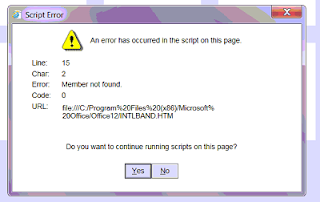
Internet Explorer script error INTLBAND.HTM

Imagen
Un error no tan frecuente y del cual no hay mucha informacion para solucionar son los errores de script que se presentan cuando se actualizo el Internet Explorer (ie). Puede pasar de pasar de cualquier version a otra. Este es un ejemplo tipico, tal vez el mas comun ahora que el W7 es lo mas viejito en Sistemas Operativos de PC. Pasar del ie9 al ie11. La clave para resolver el problema es el archivo INTLBAND.HTM cuya ruta esta en el mismo cuadro de dialogo. Es posible que en tu caso el problema sea con otro archivo pero funciona el mismo procedimiento. A. Renombra o Borra el archivo INTLBAND.HTM      Hazlo desde windows explorer, en el caso de esta imagen       C:\Program Files (x86)\Microsoft Office\Office12 B. Borra historial, cookies, etc desde Panel de control-> Opciones de Internet C. Usa un programa como registry Mechanic (si tienes suerte), Tuneup Utilities o algun similar para descartar que exista una entrada en el registro de W...

Java 1.7 SAT

Si te ha salido el clásico error "Se necesita Java 1.7"cuando estas usando la pagina del SAT (Servicio de Administración Tributaria) déjame decirte que será muy difícil que encuentres esa versión disponible para descarga. Hoy 18 de Julio 2016 la Ultima versión es la 8.91 y es completamente compatible con el SAT. Cada versión de Java incluye mejoras a las versiones anteriores de manera que no necesitas estar eternamente amarrado con la versión 1.7 que supuestamente la pagina del SAT te dice. Es necesario hacer unas consideraciones: UNO. Olvídate de Chrome, ya no es compatible con JAVA, no pierdas tu tiempo. DOS. Baja la última versión de Firefox e Instálala. TRES. Desinstala todos los JAVA que tengas baja la última versión e Instálala. CUATRO. Configura JAVA + En el panel de control ve a Java y selecciona la pestana Seguridad + Copia todos los links en donde te sale el error de java + Da click en el boton Edit Site List + Agrega el link que ...